This post onwards, I will begin a series of Drupal tutorials, tips and tricks starting from basics.
As you might be aware, Drupal is one of the most popular Content Management Systems (CMS) available. For those who don't know what a CMS is, Wikipedia defines a CMS as :
A content management system (CMS) is a computer application used to manage work flow needed to collaboratively create, edit, review, index, search, publish and archive various kinds of digital media and electronic text.
What this means in layman's terms is that a CMS like Drupal can be used to make any possible kind of Website. Drupal has been made on a PHP-MySQL framework and is an Open Source Application, which means that its source is available to everyone for no cost. If you are not a programmer, don't lose heart as most of the work in Drupal is done through an Administrative Panel which requires no programming skills.
Now the question arises "Why Drupal"? We have the very popular Joomla with us as well, then why should we use Drupal? This is a question which haunts every person starting up with learning a CMS. This answer is better answered by this IBM consultant on this page.
Search for differences and comparisons between the two on Google and you will realise that Drupal is better written, better documented and is more powerful than its nearest competitor Joomla.
A major distinguishing feature between the two is the Drupal Community which is very actively involved in making modules
What kind of sites can be built using Drupal? social networking, community blogging, photo gallery, e-commerce, tutorials, travel and anything you can think of. From the simplest to the most complex sites. To have a look at various sites built using Drupal, visit http://www.drupalsites.net/ .
Sunday, June 21, 2009


Sunday, May 31, 2009
PHP Regular Expressions Cheat Sheet
The following should be escaped if you are trying to match that character

\ ^ . $ | ( ) [ ]
 * + ? { } ,

 Special Character Definitions
\ Quote the next metacharacter^ Match the beginning of the line. Match any character (except newline)$ Match the end of the line (or before newline at the end)| Alternation() Grouping[] Character class* Match 0 or more times+ Match 1 or more times? Match 1 or 0 times{n} Match exactly n times{n,} Match at least n times{n,m} Match at least n but not more than m timesMore Special Character Stuff\t tab (HT, TAB)\n newline (LF, NL)\r return (CR)\f form feed (FF)\a alarm (bell) (BEL)\e escape (think troff) (ESC)\033 octal char (think of a PDP-11)\x1B hex char\c[ control char\l lowercase next char (think vi)\u uppercase next char (think vi)\L lowercase till \E (think vi)\U uppercase till \E (think vi)\E end case modification (think vi)\Q quote (disable) pattern metacharacters till \EEven More Special Characters\w Match a "word" character (alphanumeric plus "_")\W Match a non-word character\s Match a whitespace character\S Match a non-whitespace character\d Match a digit character\D Match a non-digit character\b Match a word boundary\B Match a non-(word boundary)\A Match only at beginning of string\Z Match only at end of string, or before newline at the end\z Match only at end of string\G Match only where previous m//g left off (works only with /g)
Thursday, May 21, 2009
How to schedule boot scan in Avast AntiVirus?
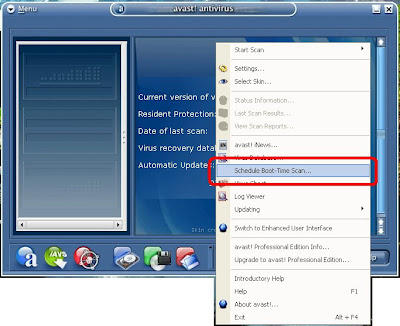
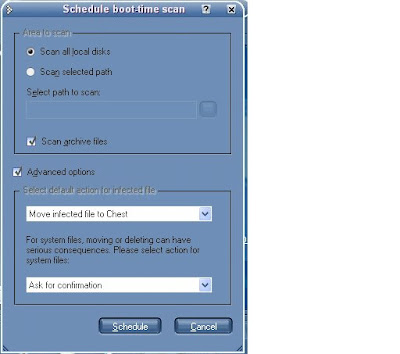
The best possible way to scan your computer for infection using Avast is to schedule a boot scan. A normal boot scan may take upto 45 minutes to complete. The following are the steps to schedule a boot scan:
And there you go. Just restart your system, sit back and relax.
- Open your Avast panel.
- Right-Click anywhere in between the panel.
- Select the option "Schedule Boot-Time Scan....".

- Next Select the options as you desire. I recommend them as in the image.

And there you go. Just restart your system, sit back and relax.
Sunday, April 5, 2009
Which is the best Free Anti Virus?
The first thing that comes to your mind when thinking of PC security is an Anti Virus. There are quite a few free anti virus available, the most popular being Avast, AVG and Avira. Before installing any, just have a look at the test reports on the page http://www.av-comparatives.org/comparativesreviews/main-tests
Avast and Avira perform almost equally, but I'll say that Avast has an upper edge because of its Boots Scan capability. Also Avira free version doesn't have rootkit protection but avast free version has :) AVG is not recommended, too many false positives.
A unique feature in AVG is its Link Scanner, but its not much effective. Use Web Of Trust as an Add-On for your Browser (which I recommend to be Firefox) instead.
We also have the less popular NOD32 and BitDefender. The problem with these is that they are too slow at scanning and are not updated as regularly. In terms of updates, again its Avast which gets the pie. It updates every 4 hours!
I personally use Avast! have been using it along with SpyBot, Zone Alarm and Spyware Blaster for two years now and without any infection.
Also all these are very compatible with each other, so no crashes.
Safe Computing!
Avast and Avira perform almost equally, but I'll say that Avast has an upper edge because of its Boots Scan capability. Also Avira free version doesn't have rootkit protection but avast free version has :) AVG is not recommended, too many false positives.
A unique feature in AVG is its Link Scanner, but its not much effective. Use Web Of Trust as an Add-On for your Browser (which I recommend to be Firefox) instead.
We also have the less popular NOD32 and BitDefender. The problem with these is that they are too slow at scanning and are not updated as regularly. In terms of updates, again its Avast which gets the pie. It updates every 4 hours!
I personally use Avast! have been using it along with SpyBot, Zone Alarm and Spyware Blaster for two years now and without any infection.
Also all these are very compatible with each other, so no crashes.
Safe Computing!
Sunday, March 22, 2009
HKLM\Software\UAC* key prompt in RootKitRevealer
After about a month of troubled computing, I finally ran the rootkitrevealer and the first prompt that I got was that of the key HKLM\Software\UAC*
If you also get it, chances are that you have been rootkited by Win32:Rootkit-gen.
A lot of googling revealed nothing as the rootkit team was unaware of the origin of the key.
So, I just started XP in safe mode and started Avast! Antivirus (Free Edition) and it detected a trojan in my operating system memory and recommended a boot scan.
To see how to schedule a boot scan click here.
The bootscan revealed 9 files in system32 infected by the Trojan Horse "WIN32: Fasec" and it had infected dll files in the System32, Temp and System32/drivers folders which not to my surprise were named as UACqumepxb.dll , UACdnberxns.dll etc, so you see the names are like UAC*. I just moved all the files to Chest (although I was prompted that the files i am about to move are System Files) as I was pretty sure that the DLLs were generated by the trojan and wrere named like UAC followed by a random string.
And now another RootKitRevealer scan doesn't show those keys!
It also solved another problem. my C: was not being mounted in the RKR scan which is now being scanned as well.
This is what my Scan Report looked like, it can be found in C:\Program Files\Alwil Software\Avast4\DATA\report\aswBoot.
03/22/2009 19:59
Scan of all local drives
File C:\WINDOWS\system32\drivers\UACbqumepxb.sys is infected by Win32:Rootkit-gen [Rtk], Moved to chest
File C:\WINDOWS\system32\UACdnberxns.dll is infected by Win32:Fasec [Trj], Moved to chest
File C:\WINDOWS\system32\UACiorjdptm.dll is infected by Win32:Fasec [Trj], Moved to chest
File C:\WINDOWS\system32\UACqjbpjwbm.dll is infected by Win32:Fasec [Trj], Moved to chest
File C:\WINDOWS\system32\UACwpwcdooe.dll is infected by Win32:Fasec [Trj], Moved to chest
File C:\WINDOWS\Temp\UAC828d.tmp is infected by Win32:Fasec [Trj], Moved to chest
File C:\WINDOWS\Temp\UAC8608.tmp is infected by Win32:Fasec [Trj], Moved to chest
File C:\WINDOWS\Temp\UAC9e24.tmp is infected by Win32:Fasec [Trj], Moved to chest
Number of searched folders: 15607
Number of tested files: 148765
Number of infected files: 8
If you also get it, chances are that you have been rootkited by Win32:Rootkit-gen.
A lot of googling revealed nothing as the rootkit team was unaware of the origin of the key.
So, I just started XP in safe mode and started Avast! Antivirus (Free Edition) and it detected a trojan in my operating system memory and recommended a boot scan.
To see how to schedule a boot scan click here.
The bootscan revealed 9 files in system32 infected by the Trojan Horse "WIN32: Fasec" and it had infected dll files in the System32, Temp and System32/drivers folders which not to my surprise were named as UACqumepxb.dll , UACdnberxns.dll etc, so you see the names are like UAC*. I just moved all the files to Chest (although I was prompted that the files i am about to move are System Files) as I was pretty sure that the DLLs were generated by the trojan and wrere named like UAC followed by a random string.
And now another RootKitRevealer scan doesn't show those keys!
It also solved another problem. my C: was not being mounted in the RKR scan which is now being scanned as well.
This is what my Scan Report looked like, it can be found in C:\Program Files\Alwil Software\Avast4\DATA\report\aswBoot.
03/22/2009 19:59
Scan of all local drives
File C:\WINDOWS\system32\drivers\UACbqumepxb.sys is infected by Win32:Rootkit-gen [Rtk], Moved to chest
File C:\WINDOWS\system32\UACdnberxns.dll is infected by Win32:Fasec [Trj], Moved to chest
File C:\WINDOWS\system32\UACiorjdptm.dll is infected by Win32:Fasec [Trj], Moved to chest
File C:\WINDOWS\system32\UACqjbpjwbm.dll is infected by Win32:Fasec [Trj], Moved to chest
File C:\WINDOWS\system32\UACwpwcdooe.dll is infected by Win32:Fasec [Trj], Moved to chest
File C:\WINDOWS\Temp\UAC828d.tmp is infected by Win32:Fasec [Trj], Moved to chest
File C:\WINDOWS\Temp\UAC8608.tmp is infected by Win32:Fasec [Trj], Moved to chest
File C:\WINDOWS\Temp\UAC9e24.tmp is infected by Win32:Fasec [Trj], Moved to chest
Number of searched folders: 15607
Number of tested files: 148765
Number of infected files: 8
Sunday, March 1, 2009
Getting Youtube Videos to run on your phone
So you have just seen a video on You Tube and are wondering how you can run it on your phone which supports only 3GP videos, like my Nokia 5300, never mind if it plays MP4 or AVI too, the steps are the same.
First of all you will have to download and install the following softwares, don't frown, they are all freewares and they are not paying me any commission.
Doremisoft FLV to 3GP Converter
Now go to your favourite video on You Tube or any other site for that matter.
Right Click on the video and click on "Download this video to Real Player".
Now run the FLV to 3GP Converter and select your input and output files, and you get a 3GP video.
Now, if this does not run on your phone, you will need DVD Video Soft to decrease the resolution of the video. Thats pretty easy, select your input and output files and from the Presets drop-down list, select the appropriate resolution and you are done!
Subscribe to:
Posts (Atom)